> For the complete documentation index, see [llms.txt](https://tailieu.smax.ai/llms.txt). Markdown versions of documentation pages are available by appending `.md` to page URLs; this page is available as [Markdown](https://tailieu.smax.ai/nhan-tin/tinh-nang-nang-cao/followup.md).
# FollowUp
{% hint style="warning" %}
FollowUp là chức năng dùng để:
* Xem danh sách các luồng bám đuổi mà khách hàng đã được thêm vào
* Thêm khách hàng vào luồng bám đuổi mới
{% endhint %}
Tham khảo cách tạo luồng bám đuổi: Bám đuổi
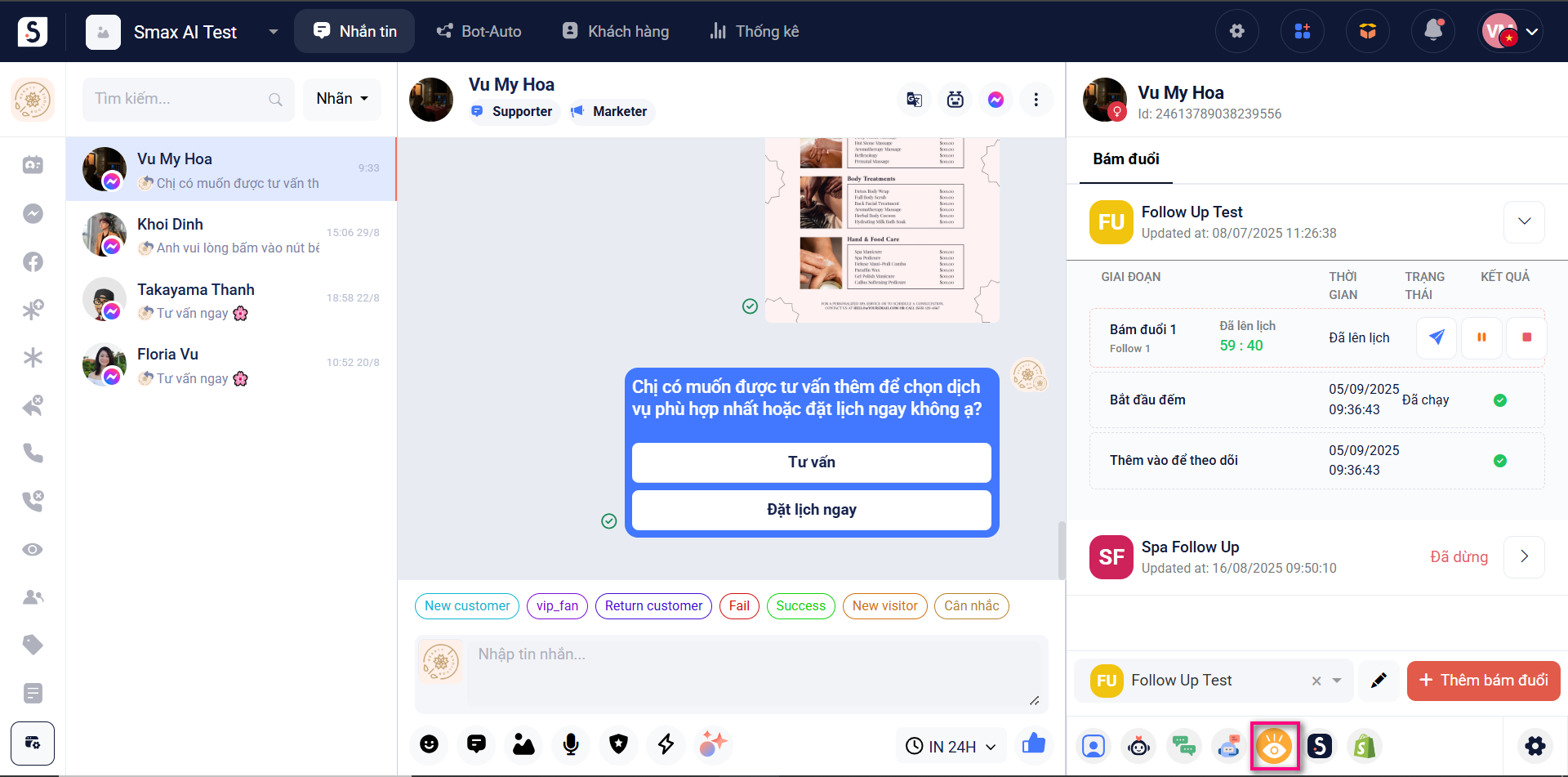
Để sử dụng, trong **module Nhắn tin** chọn **biểu tượng FollowUp**
Tại đây bạn có thể xem **danh sách các luồng mà khách hàng đã được thêm vào (1)** bao gồm tên, thời gian, trạng thái và kết quả của luồng bám đuổi
Ngoài ra bạn cũng có thể **thêm khách hàng vào luồng bám đuổi mới (2)** bằng cách chọn luồng bất kỳ và bấm **Thêm bám đuổi**