> For the complete documentation index, see [llms.txt](https://tailieu.smax.ai/llms.txt). Markdown versions of documentation pages are available by appending `.md` to page URLs; this page is available as [Markdown](https://tailieu.smax.ai/ket-noi-and-tich-hop/website.md).

# Website

{% hint style="warning" %}
Hướng dẫn thêm kết nối Website vào SmaxAi
{% endhint %}

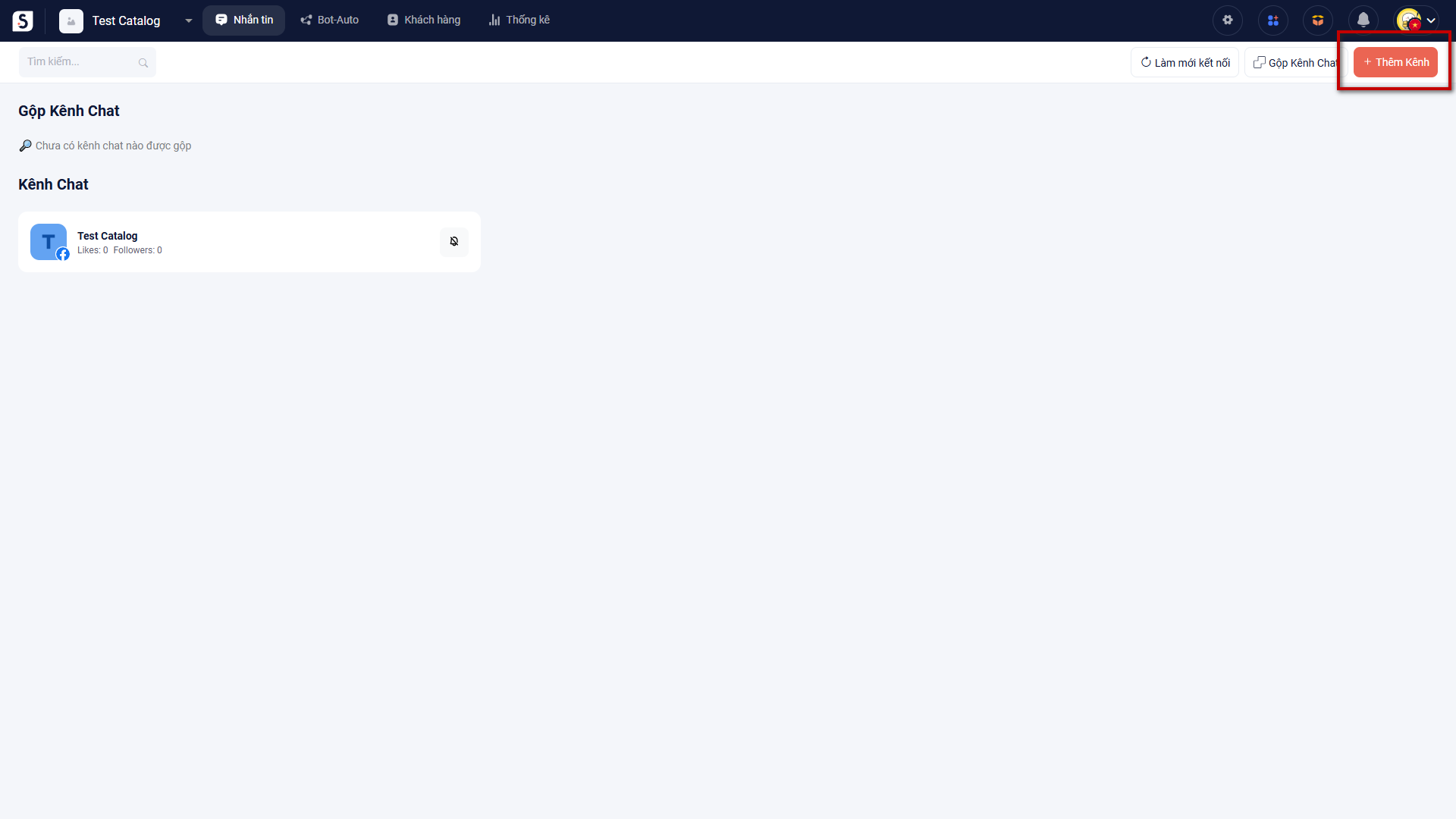
Để thêm kênh chat Website vào SmaxAi, bạn chọn Thêm kênh trong module Nhắn tin

<figure><img src="https://1875681896-files.gitbook.io/~/files/v0/b/gitbook-x-prod.appspot.com/o/spaces%2Fsr3EiPwgSuzEXI3u1tC1%2Fuploads%2FgglQk02BcNcYJH6W8etI%2Fimage.png?alt=media&amp;token=20efdb85-75a2-4e52-963b-715abf3ac4f4" alt=""><figcaption></figcaption></figure>

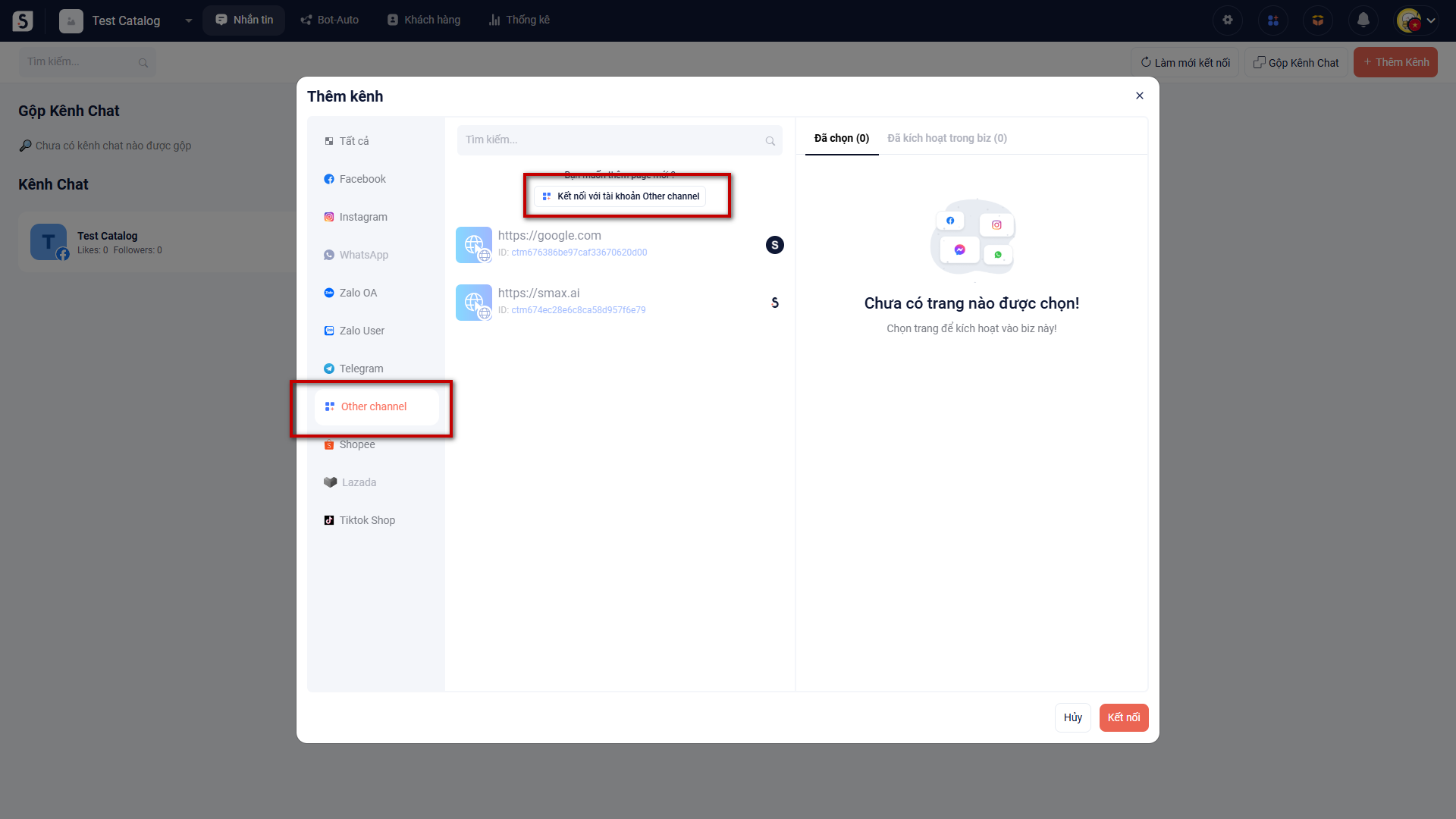
Sau đó chọn Other Channel và chọn Kết nối với tài khoản Other channel

<figure><img src="https://1875681896-files.gitbook.io/~/files/v0/b/gitbook-x-prod.appspot.com/o/spaces%2Fsr3EiPwgSuzEXI3u1tC1%2Fuploads%2FPTCTaYP4PEwolkk2McPr%2Fimage.png?alt=media&amp;token=bc093d17-8cb7-4663-974a-8a0ae60a1197" alt=""><figcaption></figcaption></figure>

Sau đó nhập tên Website muốn nhúng plugin chat và chọn Lưu

<figure><img src="https://1875681896-files.gitbook.io/~/files/v0/b/gitbook-x-prod.appspot.com/o/spaces%2Fsr3EiPwgSuzEXI3u1tC1%2Fuploads%2Ft26XQZ9icp4RDpdLvJBd%2Fimage.png?alt=media&amp;token=5f8ab0ce-7c10-4fe6-b6c4-833410b750d6" alt=""><figcaption></figcaption></figure>

Chọn Thêm kênh này, sau đó chọn Kết nối để kết nối Website vào SmaxAi

<figure><img src="https://1875681896-files.gitbook.io/~/files/v0/b/gitbook-x-prod.appspot.com/o/spaces%2Fsr3EiPwgSuzEXI3u1tC1%2Fuploads%2F3nlR6n7WGCEKtbo4re7r%2Fimage.png?alt=media&amp;token=278188bb-6c83-47a3-8697-6c78777f8118" alt=""><figcaption></figcaption></figure>

XEM HƯỚNG DẪN TẠO PLUGIN CHAT TẠI ĐÂY

{% content-ref url="/pages/V2xkvfc84D97OMDGMPae" %}
[Website Trigger](/bot-auto/trigger/website-trigger.md)
{% endcontent-ref %}