> For the complete documentation index, see [llms.txt](https://tailieu.smax.ai/llms.txt). Markdown versions of documentation pages are available by appending `.md` to page URLs; this page is available as [Markdown](https://tailieu.smax.ai/ket-noi-and-tich-hop/shopee.md).

# Shopee

{% hint style="warning" %}
Hướng dẫn thêm kết nối tài khoản Shopee vào SmaxAi
{% endhint %}

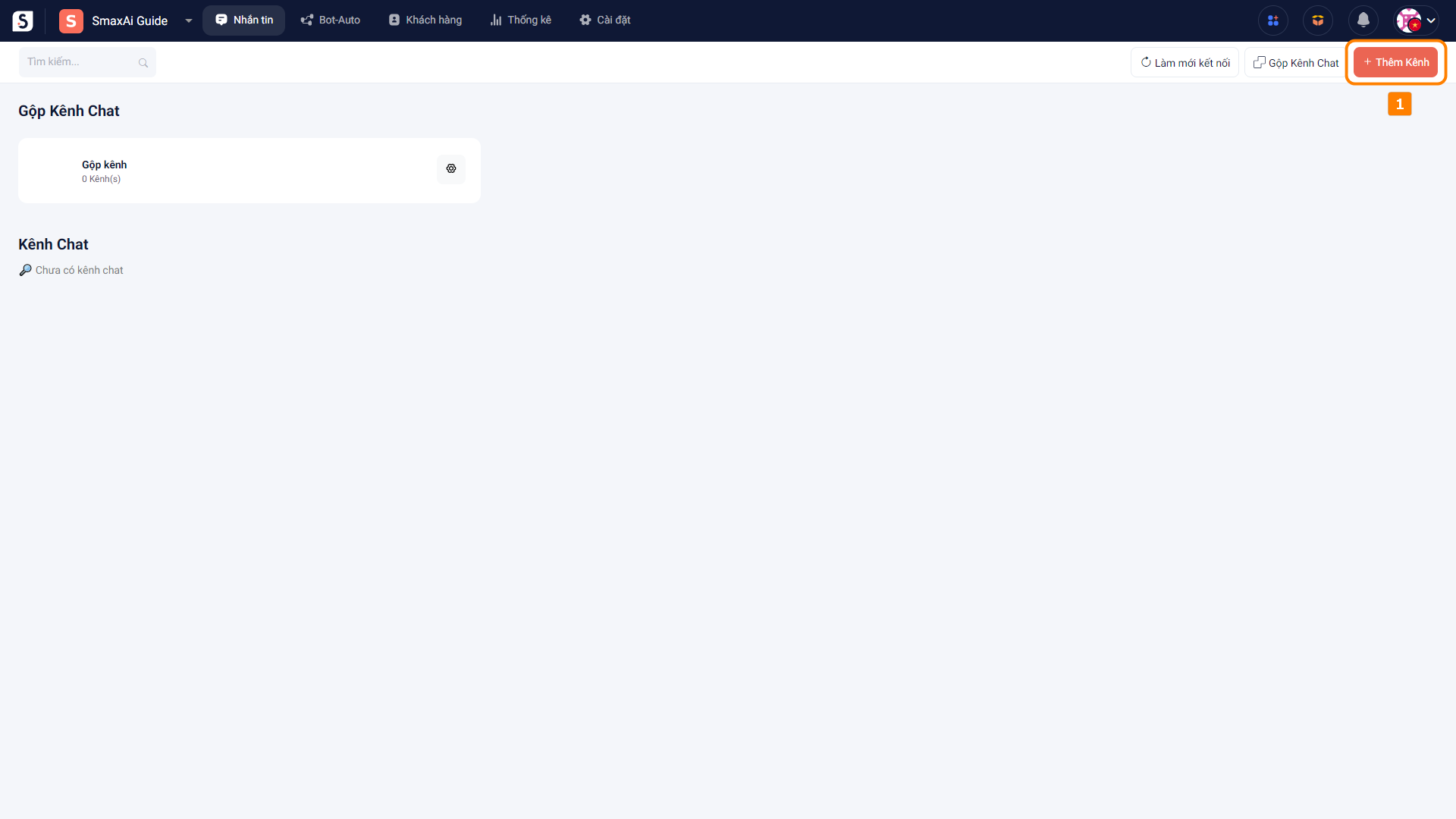
Để kết nối tài khoản Shopee vào SmaxAi, tại màn hình của <mark style="color:orange;">**module Nhắn tin**</mark> chọn <mark style="color:orange;">**Thêm kênh (1)**</mark>

<figure><img src="https://1875681896-files.gitbook.io/~/files/v0/b/gitbook-x-prod.appspot.com/o/spaces%2Fsr3EiPwgSuzEXI3u1tC1%2Fuploads%2Fkokp29cD8dQSoANUyZEC%2Fimage.png?alt=media&amp;token=4cbec055-bc16-46f1-864e-e431323dc296" alt=""><figcaption></figcaption></figure>

Trong cửa sổ Thêm kênh, chọn <mark style="color:orange;">**Shopee (2)**</mark> và chọn <mark style="color:orange;">**Kết nối với tài khoản shopee (3)**</mark>

<figure><img src="https://1875681896-files.gitbook.io/~/files/v0/b/gitbook-x-prod.appspot.com/o/spaces%2Fsr3EiPwgSuzEXI3u1tC1%2Fuploads%2FT9sJ10ZnwOe2wfkr9fX8%2Fimage.png?alt=media&amp;token=04e71f9c-5838-4893-9a61-db18af00411e" alt=""><figcaption></figcaption></figure>

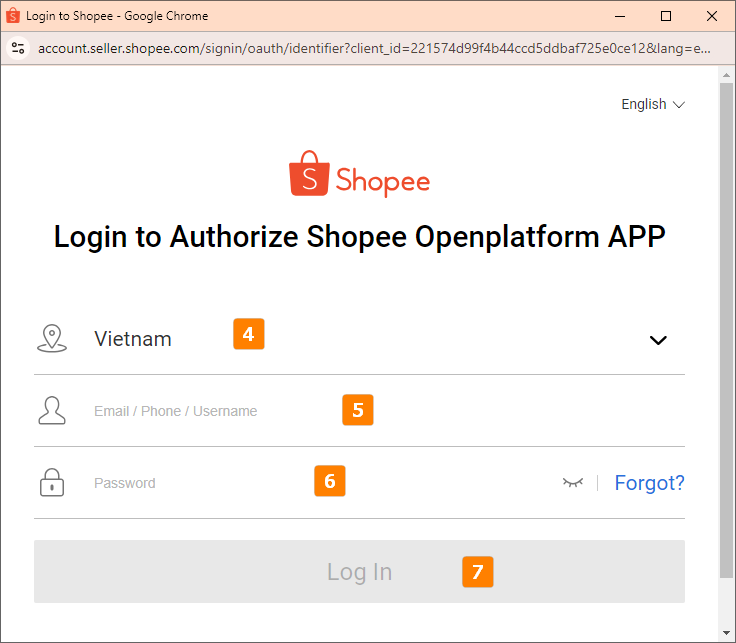
Chọn <mark style="color:orange;">**vị trí cửa hàng (4)**</mark>, nhập <mark style="color:orange;">**tài khoản (5)**</mark>, <mark style="color:orange;">**mật khẩu (6)**</mark> và chọn <mark style="color:orange;">**Log In (7)**</mark> để đăng nhập

<figure><img src="https://1875681896-files.gitbook.io/~/files/v0/b/gitbook-x-prod.appspot.com/o/spaces%2Fsr3EiPwgSuzEXI3u1tC1%2Fuploads%2FmTiemoYAiXJsa05lh6sm%2Fimage.png?alt=media&amp;token=b97a546f-3bce-4dbb-a771-befdfdf2c8cb" alt=""><figcaption></figcaption></figure>

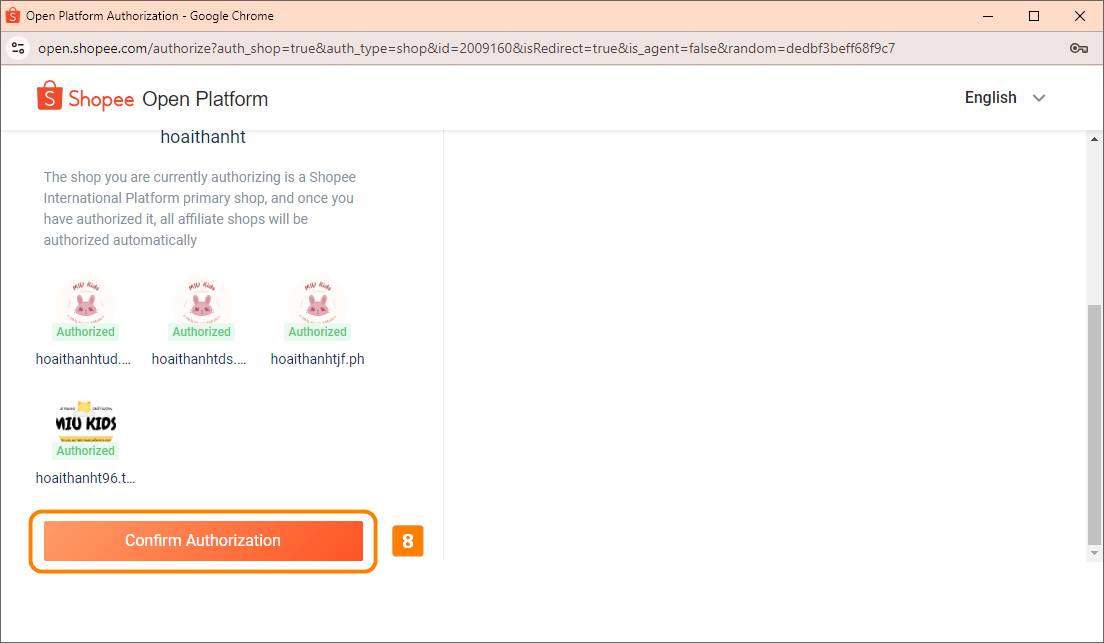
Sau khi đăng nhập, chọn <mark style="color:orange;">**Confirm Authorization (8)**</mark> để xác nhận kết nối

<figure><img src="https://1875681896-files.gitbook.io/~/files/v0/b/gitbook-x-prod.appspot.com/o/spaces%2Fsr3EiPwgSuzEXI3u1tC1%2Fuploads%2Fhbin3lwm5dijn60nqdvq%2Fimage.png?alt=media&amp;token=4255e774-e3d6-4755-afc1-add0d530552c" alt=""><figcaption></figcaption></figure>

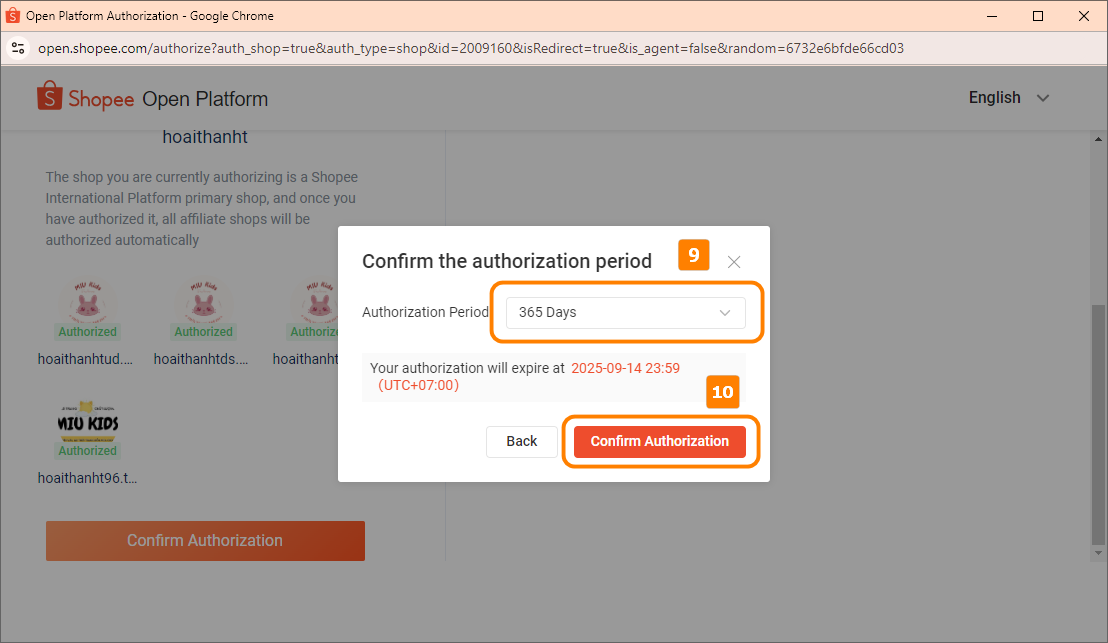
Chọn <mark style="color:orange;">**thời gian hết hạn kết nối (9)**</mark>, sau đó chọn <mark style="color:orange;">**Confirm Authorization (10)**</mark>

<figure><img src="https://1875681896-files.gitbook.io/~/files/v0/b/gitbook-x-prod.appspot.com/o/spaces%2Fsr3EiPwgSuzEXI3u1tC1%2Fuploads%2FSzHUUfrbImUE3j6zG44i%2Fimage.png?alt=media&amp;token=f72e83cf-da57-4331-a02e-db0f44cf4336" alt=""><figcaption></figcaption></figure>

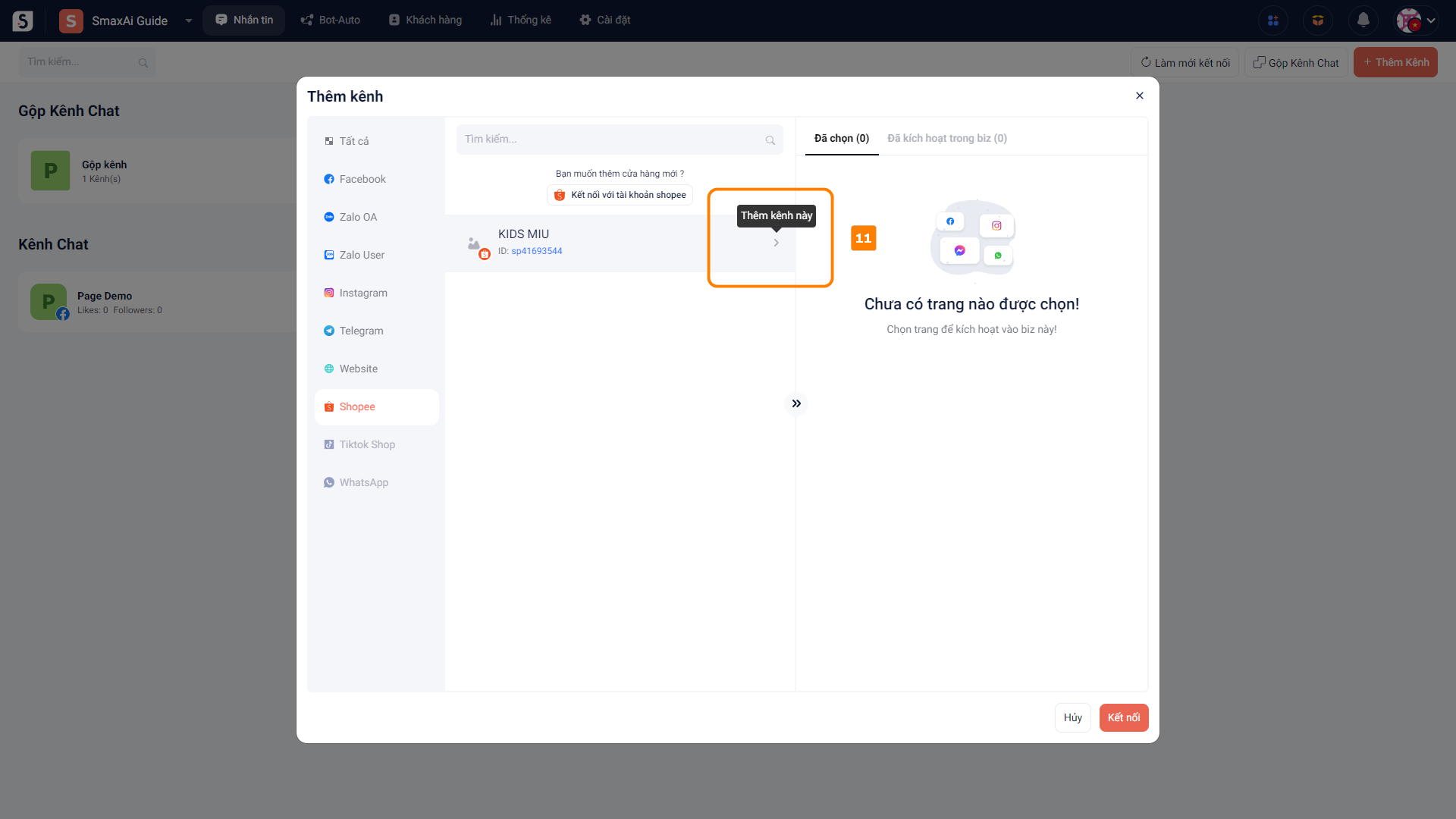
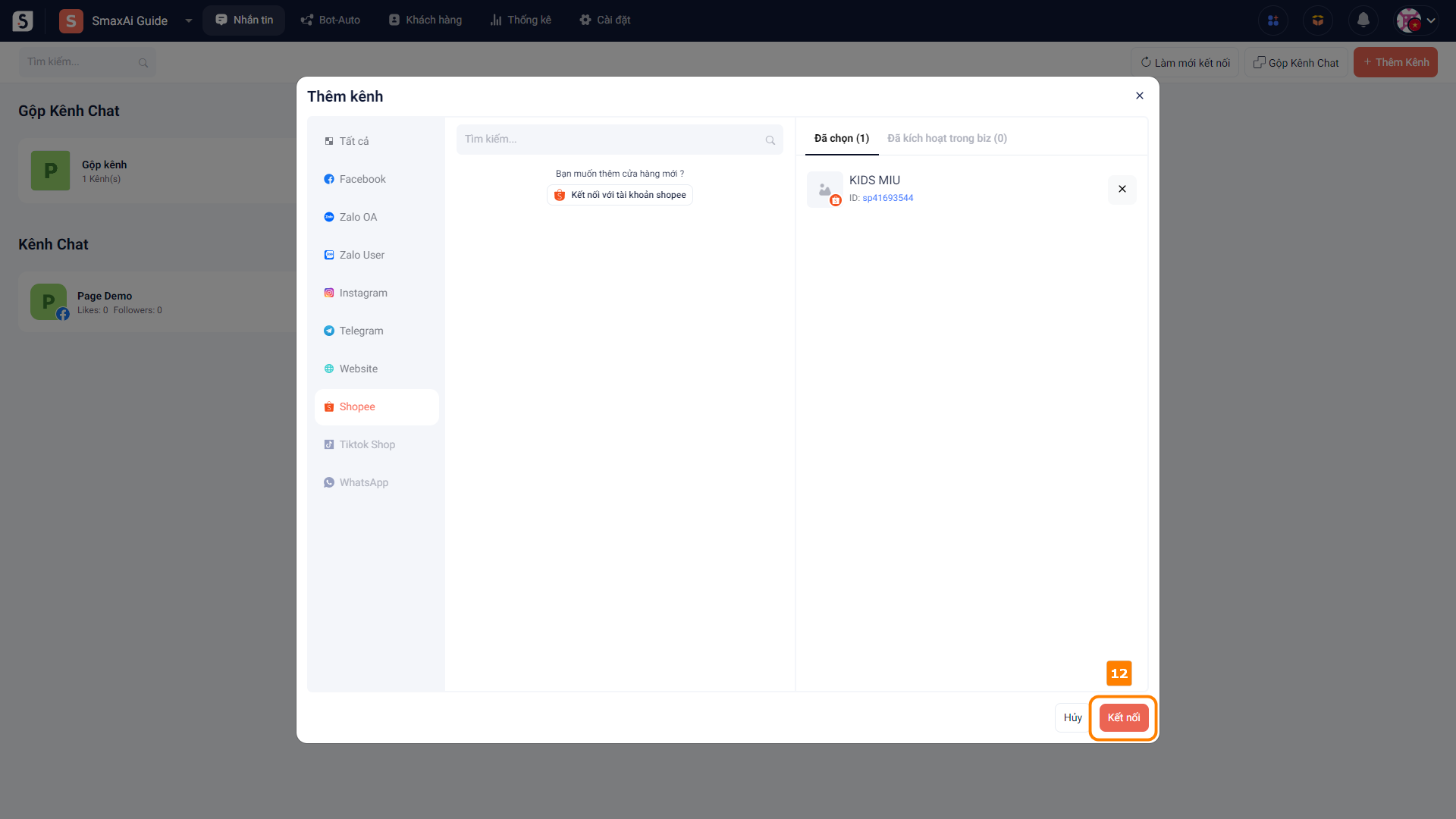
Sau khi cấp quyền, tài khoản Shopee của bạn sẽ hiển thị trong phần danh sách kênh, chọn <mark style="color:orange;">**Thêm kênh này (11)**</mark> để thêm tài khoản Shopee vào SmaxAi, sau đó chọn <mark style="color:orange;">**Kết nối (12)**</mark> để hoàn tất

<figure><img src="https://1875681896-files.gitbook.io/~/files/v0/b/gitbook-x-prod.appspot.com/o/spaces%2Fsr3EiPwgSuzEXI3u1tC1%2Fuploads%2FINCVjgbELKICZ7T55MHe%2Fimage.png?alt=media&amp;token=1f28ae57-3af2-439f-90c9-b17bbf57aee7" alt=""><figcaption></figcaption></figure>

<figure><img src="https://1875681896-files.gitbook.io/~/files/v0/b/gitbook-x-prod.appspot.com/o/spaces%2Fsr3EiPwgSuzEXI3u1tC1%2Fuploads%2FSQPpHni6kvTQKUnPEXh5%2Fimage.png?alt=media&amp;token=a2377c25-627c-40ed-a13f-66fc02d132a8" alt=""><figcaption></figcaption></figure>