> For the complete documentation index, see [llms.txt](https://tailieu.smax.ai/llms.txt). Markdown versions of documentation pages are available by appending `.md` to page URLs; this page is available as [Markdown](https://tailieu.smax.ai/ket-noi-and-tich-hop/instagram.md).

# Instagram

### Tạo trang Instagram cho Doanh nghiệp

Tương như Facebook, bạn không thể kết nối tài khoản Instagram cá nhân với Smax mà cần tạo một Fanpage. Để tạo trang Fanpage trên Instagram, bạn cần làm theo các bước sau:

**Bước 1**: Mở ứng dụng Instagram và đăng nhập vào tài khoản

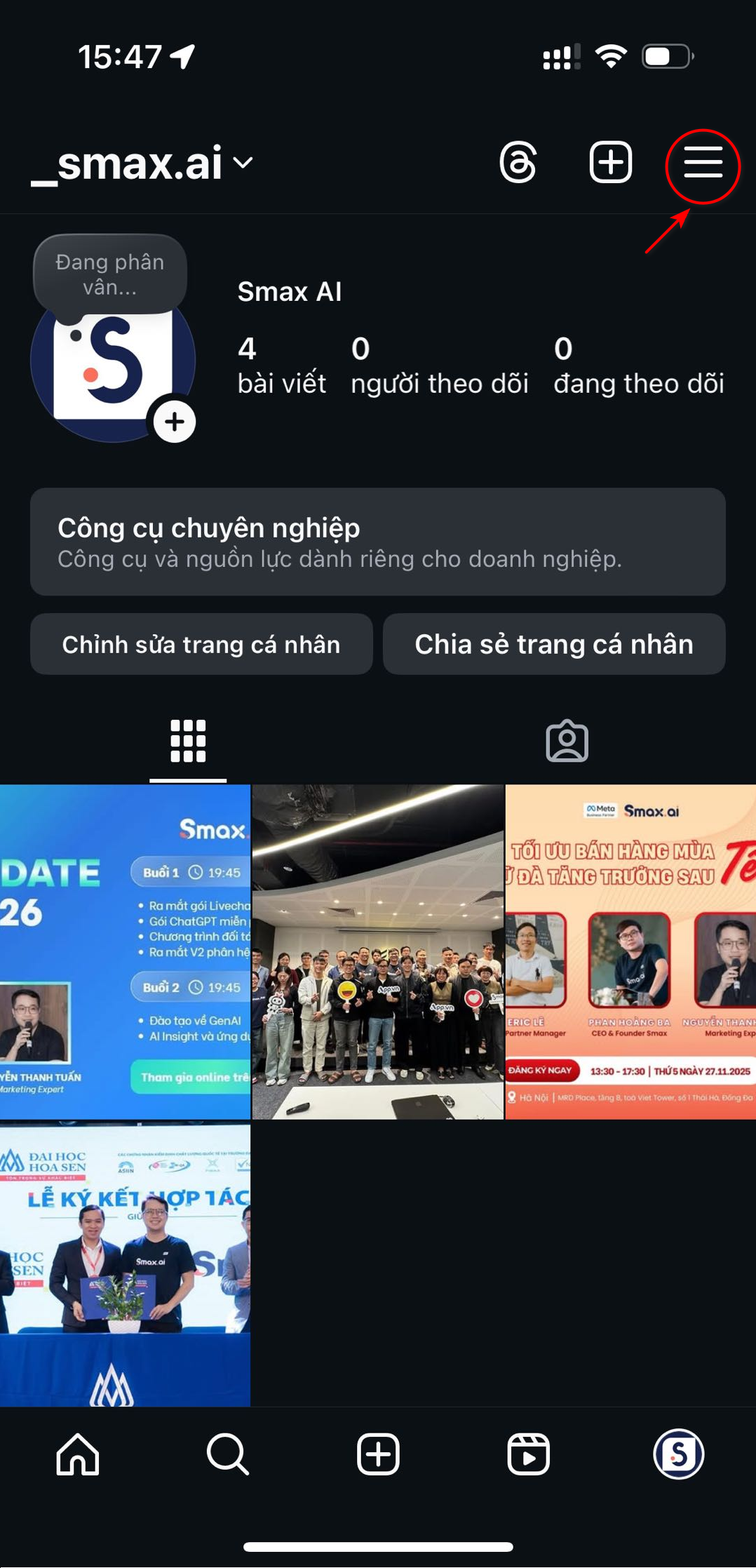
**Bước 2**: Vào trang cá nhân → **Nhấn vào mục 3 gạch ngang** phía trên

<div data-full-width="true"><figure><img src="https://1875681896-files.gitbook.io/~/files/v0/b/gitbook-x-prod.appspot.com/o/spaces%2Fsr3EiPwgSuzEXI3u1tC1%2Fuploads%2F7GZuMyK5kdQrub2YNqoS%2Fimage.png?alt=media&amp;token=71f79487-43a6-4dd1-aace-09f01806abf4" alt="" width="188"><figcaption></figcaption></figure></div>

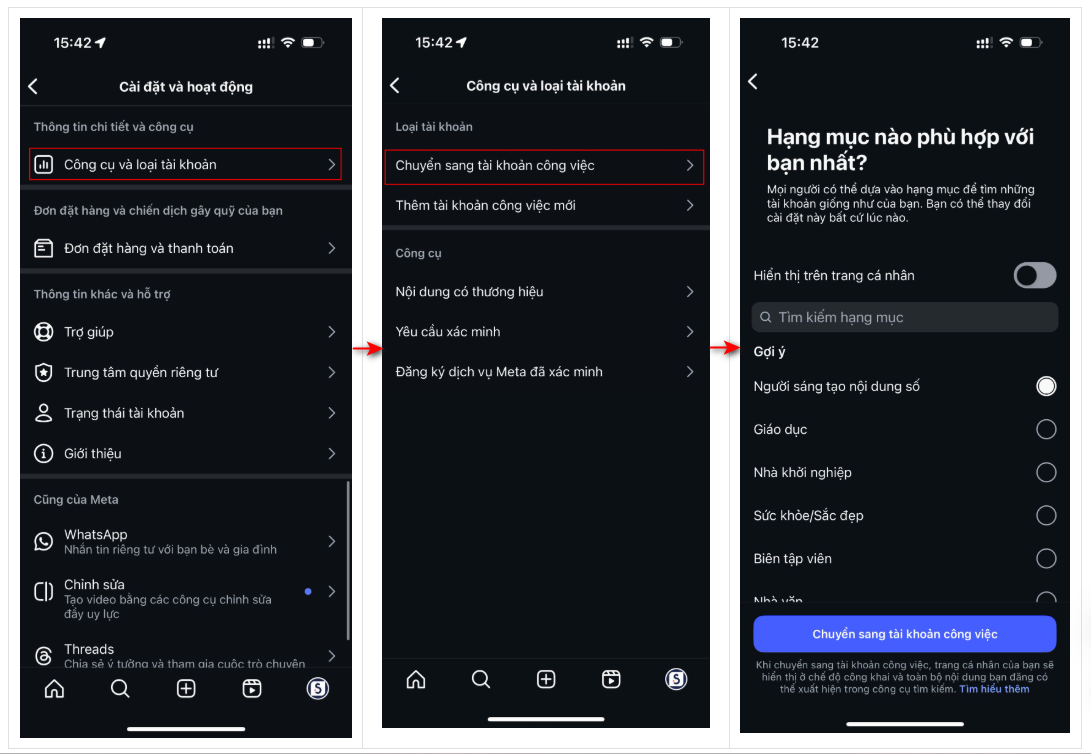
**Bước 3**: Chọn **Cài đặt** → Chọn mục **Tài khoản** → Chọn **Chuyển sang tài khoản công việc**→ Chọn **hạng mục tài khoản** Instagram của bạn

<figure><img src="https://1875681896-files.gitbook.io/~/files/v0/b/gitbook-x-prod.appspot.com/o/spaces%2Fsr3EiPwgSuzEXI3u1tC1%2Fuploads%2FWcFJJB17h70kdx56piqJ%2Fimage.png?alt=media&amp;token=086852f2-8e5f-4a0b-b011-94dde21b6d2e" alt=""><figcaption></figcaption></figure>

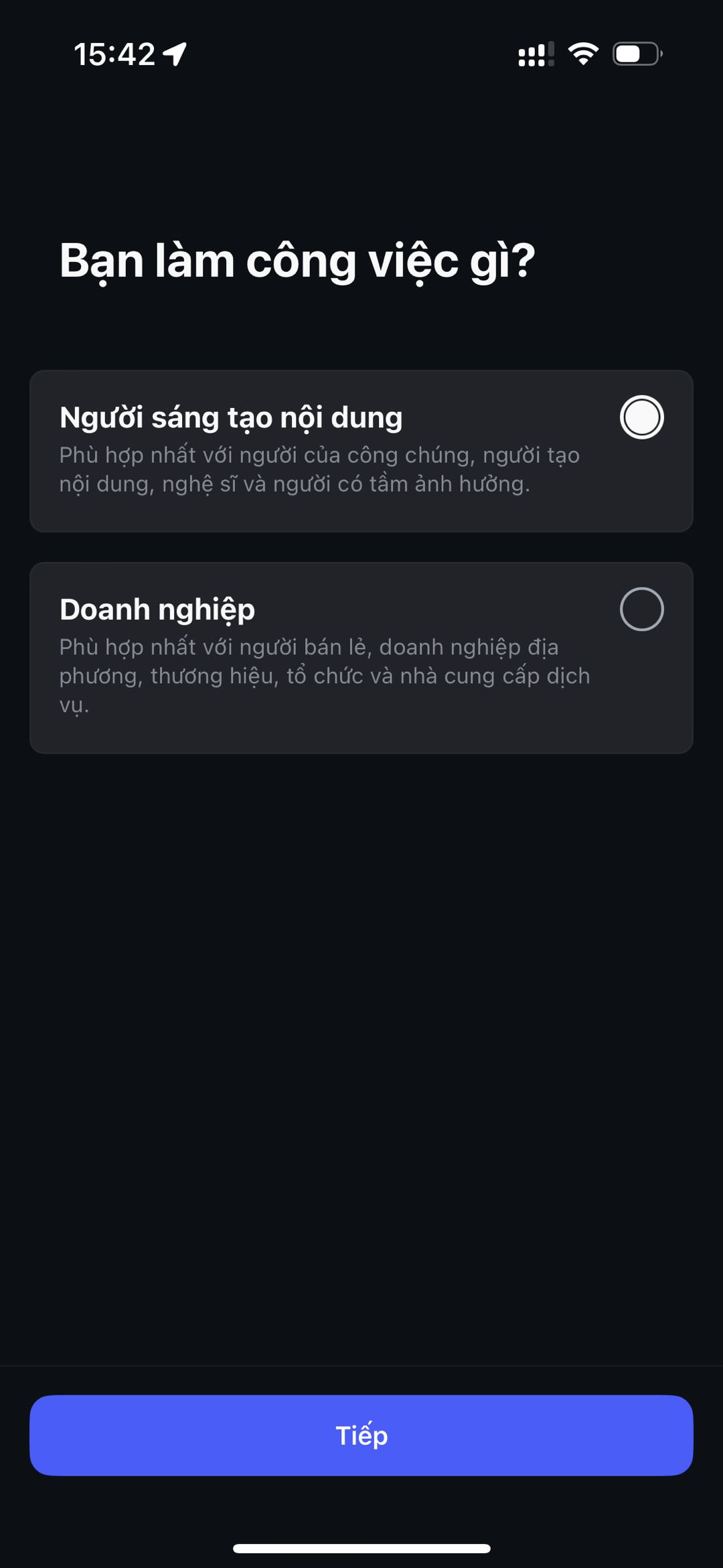
**Bước 4**: Nhấn chọn **Chọn loại tài khoản** → Bạn hoàn thành các bước hoàn thiện trang là hoàn tất.

<figure><img src="https://1875681896-files.gitbook.io/~/files/v0/b/gitbook-x-prod.appspot.com/o/spaces%2Fsr3EiPwgSuzEXI3u1tC1%2Fuploads%2FLQfQG2OOASnMq0VV79b3%2Fimage.png?alt=media&amp;token=a985fa37-cef6-4de0-bdaa-90f323929215" alt="" width="188"><figcaption></figcaption></figure>

Sau khi tạo xong tài khoản IGO trên Instagram, đăng nhập vào Smax.ai chọn kết nối Instagram và chọn trang muốn sử dụng

### Kết nối với Smax AI

Kết nối tài khoản IGO với Smax Ai theo các bước sau:

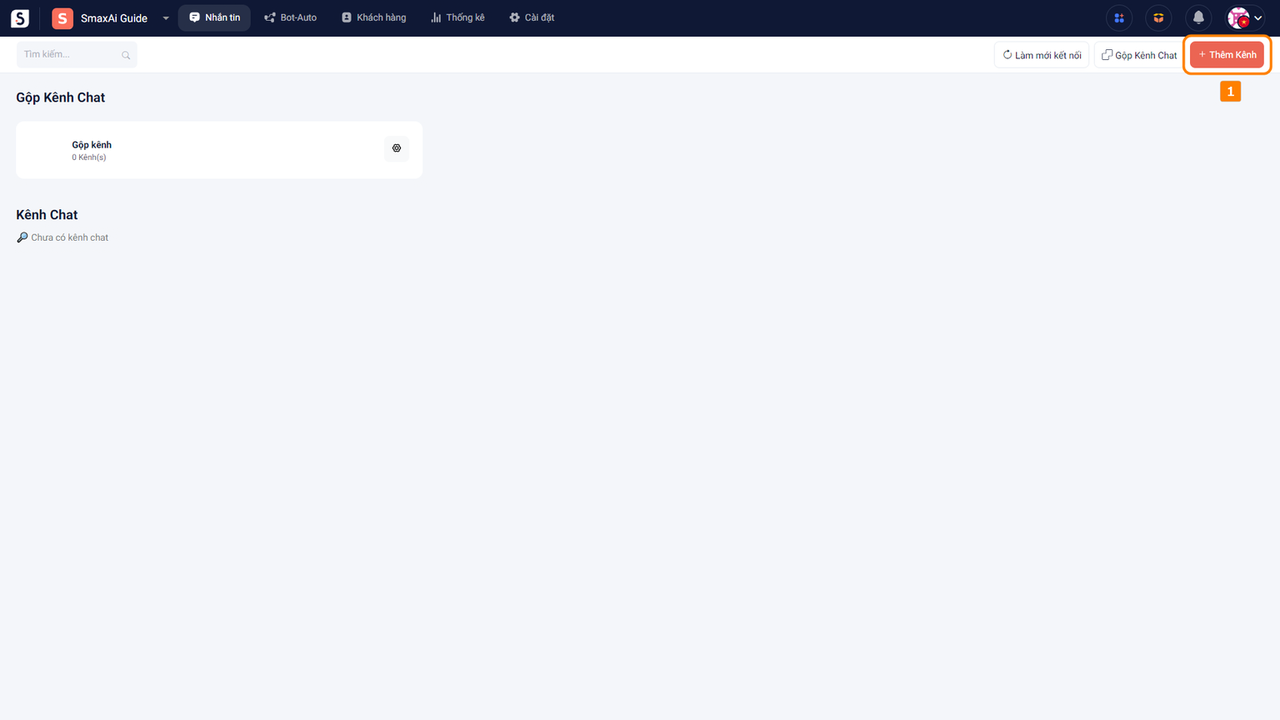
Tại màn hình của **module Nhắn tin** chọn **Thêm kênh (1)**

<figure><img src="https://1875681896-files.gitbook.io/~/files/v0/b/gitbook-x-prod.appspot.com/o/spaces%2Fsr3EiPwgSuzEXI3u1tC1%2Fuploads%2FKH0SlFZmtD2f9OmLy92Y%2Fimage.png?alt=media&amp;token=b3ea8ded-3be4-4a18-b8f5-eb3b2fc3769a" alt=""><figcaption></figcaption></figure>

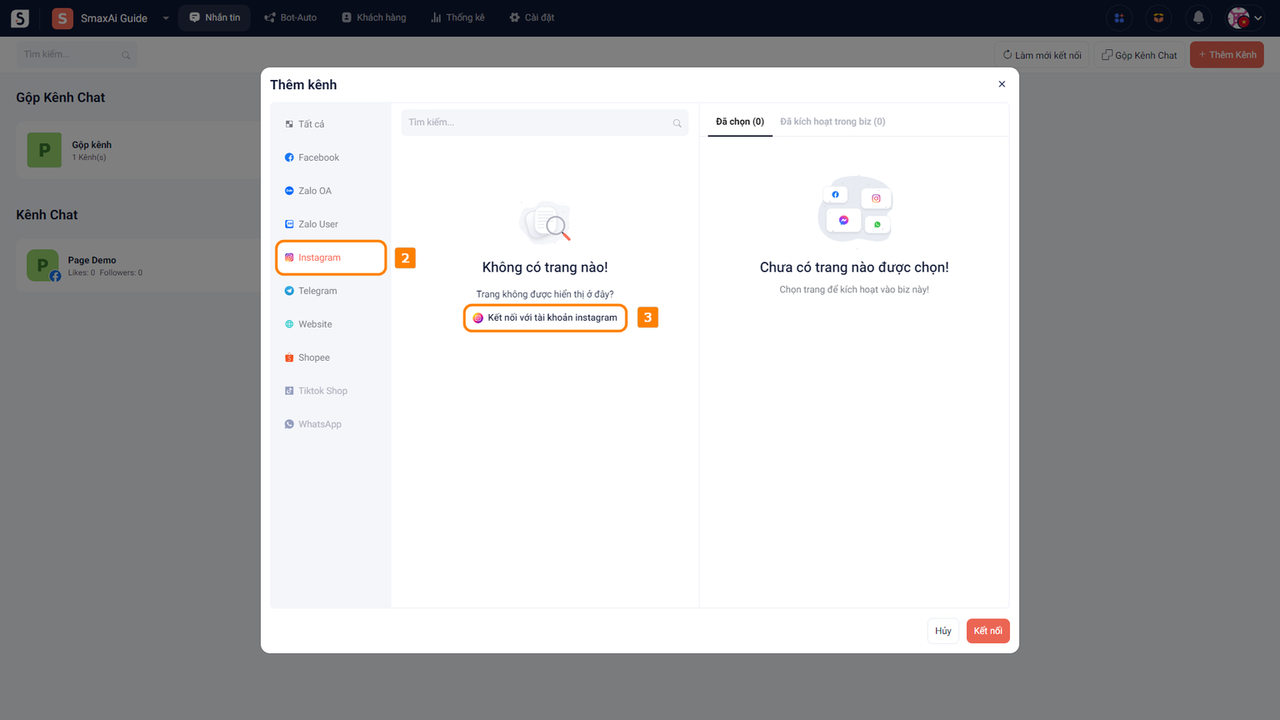
Trong cửa sổ Thêm kênh, chọn **Instagram (2)** và chọn **Kết nối với tài khoản Instagram (3)**

<figure><img src="https://1875681896-files.gitbook.io/~/files/v0/b/gitbook-x-prod.appspot.com/o/spaces%2Fsr3EiPwgSuzEXI3u1tC1%2Fuploads%2FMxf7YygvAWwIrMbaiNwz%2Fimage.png?alt=media&amp;token=21a11c3d-ac75-4b49-8d0a-8b6795fe55a4" alt=""><figcaption></figcaption></figure>

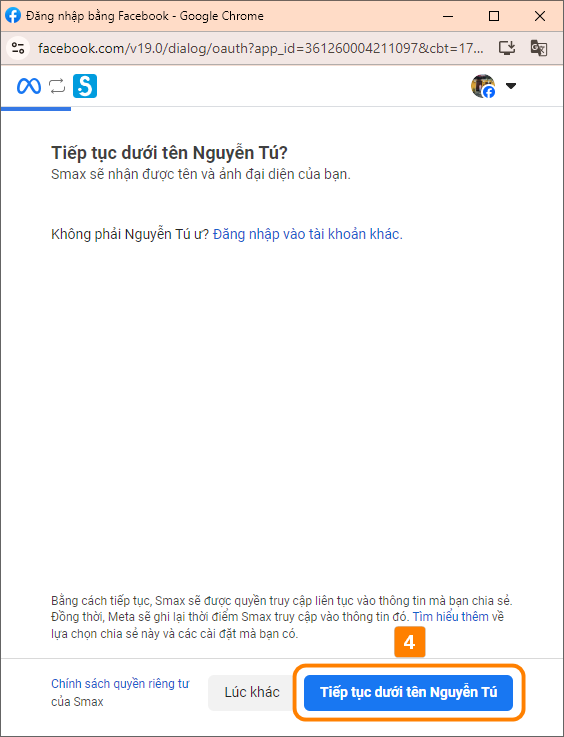
Trong cửa sổ đăng nhập Facebook, chọn **Tiếp tục dưới tên... (4)**

<figure><img src="https://1875681896-files.gitbook.io/~/files/v0/b/gitbook-x-prod.appspot.com/o/spaces%2Fsr3EiPwgSuzEXI3u1tC1%2Fuploads%2FvBiPVpK1kUdYBW6bhYd8%2Fimage.png?alt=media&amp;token=03442b41-2b8b-4207-85a6-787fc06ef826" alt="" width="282"><figcaption></figcaption></figure>

Chọn **Bắt đầu (5)** để kết nối với Instagram

<figure><img src="https://1875681896-files.gitbook.io/~/files/v0/b/gitbook-x-prod.appspot.com/o/spaces%2Fsr3EiPwgSuzEXI3u1tC1%2Fuploads%2F1UUD1Xj8nxHcIvcgmIah%2Fimage.png?alt=media&amp;token=378a01f8-15b4-47f9-8068-f9dc194eacc8" alt="" width="282"><figcaption></figcaption></figure>

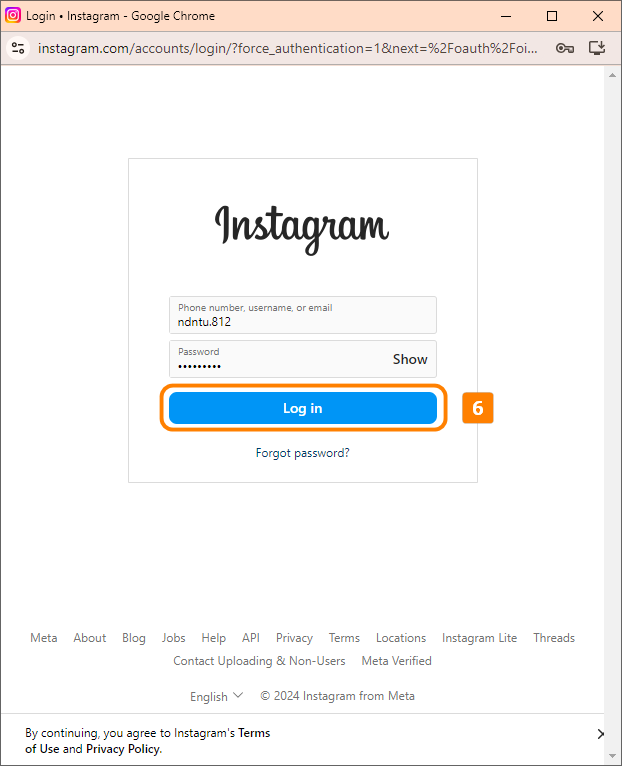
Nhập tài khoản và mật khẩu Instagram, sau đó chọn **Log in (6)**

<figure><img src="https://1875681896-files.gitbook.io/~/files/v0/b/gitbook-x-prod.appspot.com/o/spaces%2Fsr3EiPwgSuzEXI3u1tC1%2Fuploads%2FohMnKi4nt2BJfgwsQVOM%2Fimage.png?alt=media&amp;token=48b715e7-b1e9-42ed-b856-e234c911f5a3" alt="" width="311"><figcaption></figcaption></figure>

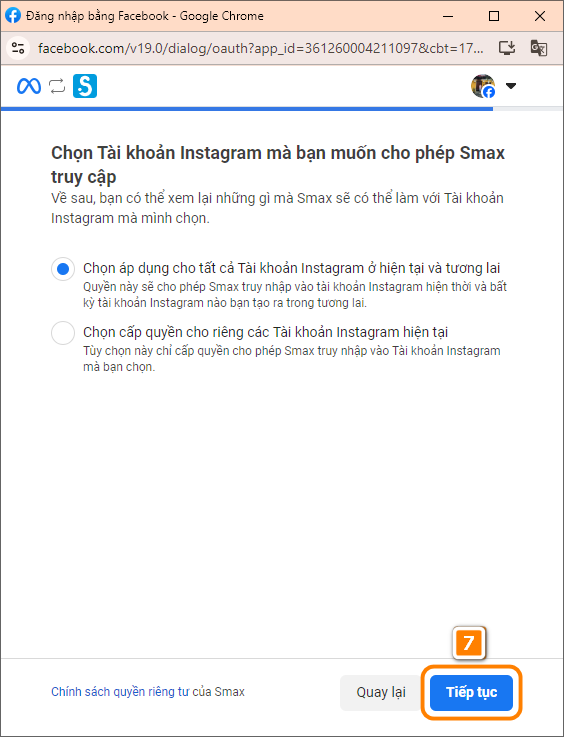
Sau khi liên kết trang Facebook và tài khoản Instagram, sau đó chọn **Tiếp tục (7)** và chọn **Lưu (8)**

<figure><img src="https://1875681896-files.gitbook.io/~/files/v0/b/gitbook-x-prod.appspot.com/o/spaces%2Fsr3EiPwgSuzEXI3u1tC1%2Fuploads%2FBTkSYQCxrTFEXrxIpvio%2Fimage.png?alt=media&amp;token=66d68f26-846c-4fe0-a0d2-0035b14c8fb6" alt="" width="282"><figcaption></figcaption></figure>

<figure><img src="https://1875681896-files.gitbook.io/~/files/v0/b/gitbook-x-prod.appspot.com/o/spaces%2Fsr3EiPwgSuzEXI3u1tC1%2Fuploads%2Fnfg5T8oeAKa2KhkJ2m58%2Fimage.png?alt=media&amp;token=1df25653-49d7-46b9-aeb1-88f12930453f" alt="" width="282"><figcaption></figcaption></figure>

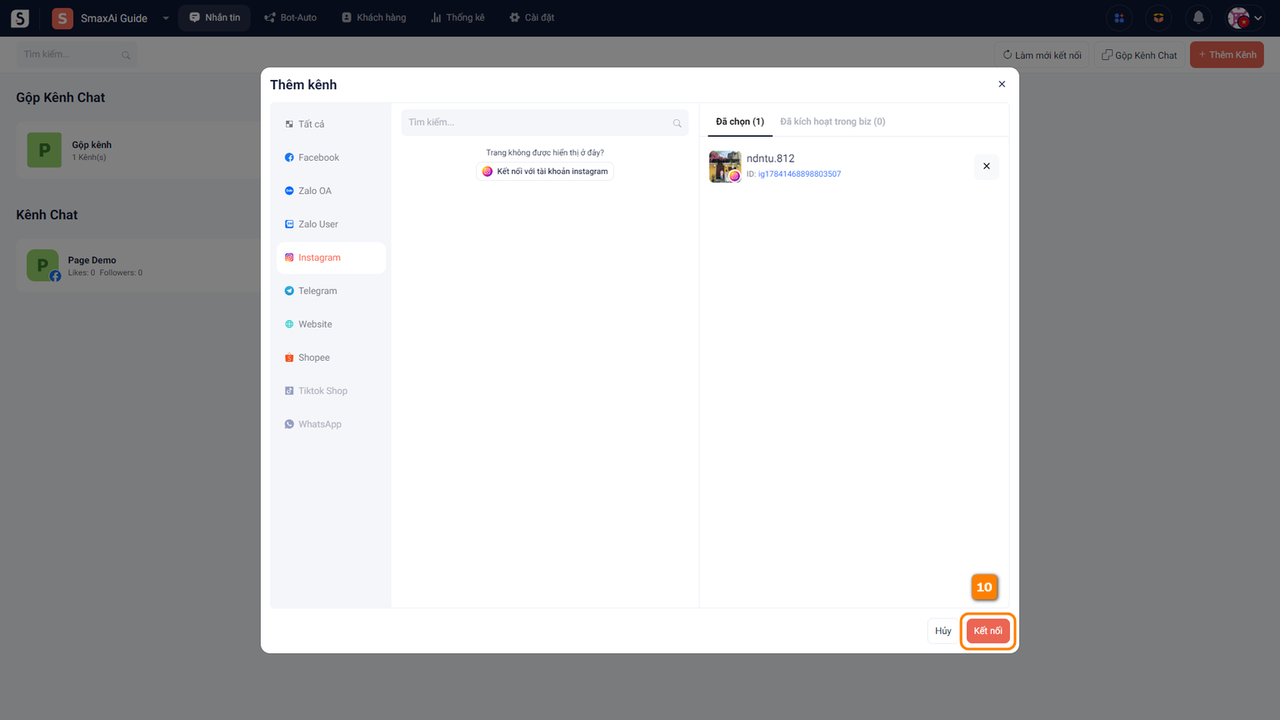
Sau khi cấp quyền, tài khoản Instagram của bạn sẽ hiển thị trong phần danh sách kênh, chọn **Thêm kênh này (9)** để thêm tài khoản Instagram vào SmaxAi, sau đó chọn **Kết nối (10)** để hoàn tất
<figure><img src="https://1875681896-files.gitbook.io/~/files/v0/b/gitbook-x-prod.appspot.com/o/spaces%2Fsr3EiPwgSuzEXI3u1tC1%2Fuploads%2FOVpE9AFAiVniisw1Dshm%2Fimage.png?alt=media&amp;token=d88bb84d-57da-475f-b0ac-350b5f5511d4" alt=""><figcaption></figcaption></figure>

<figure><img src="https://1875681896-files.gitbook.io/~/files/v0/b/gitbook-x-prod.appspot.com/o/spaces%2Fsr3EiPwgSuzEXI3u1tC1%2Fuploads%2F0AYmpuq0sgsMutM5byk3%2Fimage.png?alt=media&amp;token=4eea2451-52ae-4fcb-bb65-87391b4a11bc" alt=""><figcaption></figcaption></figure>